
eero Pro 6E (3-pack)
View on Amazon ↗Why it works
High performance, Good for many devices
Best for
larger homes, busy households
This guide is for households using Frontier Fiber. Start with the setup path: gateway/router mode, bridge or AP mode, wiring/backhaul constraints, and whether mesh is even the right fix. Product picks come after those decisions.
ISP setup checklist
Frontier Fiber note: The two biggest wins are (1) avoiding double-NAT and (2) getting the Wi‑Fi source out of the corner via placement or backhaul.
What to do first:
Frontier Fiber usually behaves like a standard fiber ONT plus router setup. If the ONT hands off Ethernet cleanly, your mesh can often be the main router. If you keep the Frontier gateway/router, put the mesh in AP mode unless you intentionally configure a bridge/passthrough-style setup.
As with other fiber services, the speed plan is rarely the dead-zone fix. Placement and a stable backhaul path matter more once wired tests near the router look good.
The ISP connection is fiber to an ONT, not cable DOCSIS. Coax in the walls can still be useful for MoCA backhaul, but it is an in-home LAN trick rather than the Frontier service path. Use Ethernet from the ONT/router when you can; use MoCA only where existing coax gives you a cleaner route to the remote node.
After setup choice
Use the picks below only after you choose router mode, AP mode, and backhaul. The same hardware can be great or frustrating depending on that setup.
As an Amazon Associate I earn from qualifying purchases.
| Pick | Why it works | Best for |
|---|---|---|
| eero Pro 6E (3-pack) Amazon ↗ | High performance, Good for many devices | larger homes, busy households |
| Deco XE75 (3-pack) Amazon ↗ | Wi-Fi 6E, Good throughput | newer devices, higher speeds |
| ZenWiFi XT8 (2-pack) Amazon ↗ | Strong performance, More power-user controls | tinkerers, fast connections |
Why it works
High performance, Good for many devices
Best for
larger homes, busy households
Why it works
Wi-Fi 6E, Good throughput
Best for
newer devices, higher speeds
Why it works
Strong performance, More power-user controls
Best for
tinkerers, fast connections
If you’re seeing inconsistent nodes / stubborn dead zones, wired backhaul is the fix.

goCoax MoCA 2.5 Adapter (2-Pack) with 2.5GbE Ethernet Port | MA2500D Ethernet Over Coax for Gaming & 4K Streaming | 2…
Best for: a verified coax LAN path needing two endpoints
Skip this if: Working Ethernet or existing compatible MoCA already meets the need, or the coax carries satellite/unknown shared or ISP service. Map the path before buying; do not buy two new adapters when only one peer is missing.
Check before buying: Needs at least two compatible MoCA peers on a connected 1125–1675 MHz path. Count a compatible built-in LAN MoCA peer before ordering; verify active ISP spectrum and splitters. Not for active satellite coax.
AI-assisted manufacturer-document review, not hands-on testing.
goCoax MA2500D, 2.5GbE port, two-adapter pack. Verify pack quantity and included power supplies in the selected listing.
Retailer reported in stock (2026-09-13). Availability checks are not editorial approval.

Filter, MoCA POE for Cable TV & OTA coaxial Networks ONLY
Best for: MoCA installs
Best for: MoCA installs

GE RG6 Coaxial Cable, 25 ft. F-Type Connectors, Quad Shielded Coax Cable, 3 GHz Digital, In-Wall Rated, Ideal for TV…
Best for: MoCA installs, coax cleanup
Amazon eero Pro 6E mesh wifi system - Supports internet plans up to 2.5 Gbps, Coverage up to 6,000 sq. ft., Connect 1…
Best for: larger homes, busy households
Watch outs:

TP-Link Deco XE75 AXE5400 Tri-Band WiFi 6E Mesh System - Wi-Fi up to 7200 Sq.Ft, Engadget Rated Best Mesh for Most Pe…
Best for: newer devices, higher speeds
Watch outs:
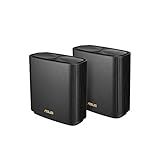
ASUS ZenWiFi AX Whole-Home Tri-Band Mesh WiFi 6 System (XT8) - 2 Pack, Coverage up to 5,500 sq.ft or 6+Rooms, 6.6Gbps…
Best for: tinkerers, fast connections
Watch outs:
Yes. The key is your modem/gateway mode and avoiding double-NAT.
Not always. Many people keep the ISP gateway and run mesh in AP mode.
Two routers doing NAT can break gaming/port-forwarding and cause weird connectivity issues.
If your ISP supports it, bridge mode + your mesh as the router is a clean setup.
Yes—especially if your gateway is stuck in a corner or utility room.