

Wiring your mesh nodes (Ethernet or MoCA) usually beats adding more wireless nodes. If you’re new to the concept, start here: what wired backhaul is. It reduces hops, increases speed, and stabilizes roaming.
Diagram

Wired backhaul replaces “hop after hop through walls” with a stable wired link. That usually improves speed and consistency.
Should you wire a node or buy another one?
| Your situation | Best first move | Why |
|---|---|---|
| One room is weak, but a hallway/stair node is already close | Fix placement first | The node may just be sitting too far into the dead zone. |
| Remote node is in the right spot but speeds swing wildly | Wire that node | The wireless hop is probably the bottleneck, not total coverage. |
| You can run Cat6 through basement, attic, or along trim | Use Ethernet backhaul | It is the simplest and most reliable long-term path. |
| You have coax near the router and weak room | Use MoCA backhaul | MoCA gives you a wired path without opening walls. |
| No coax, no clean cable path, and placement is already reasonable | Compare fallback options | Powerline is a Plan C, not the first thing to buy. |
| You are about to buy a fourth mesh node | Re-check mesh vs backhaul | Another wireless hop can make stability worse if backhaul is the real issue. |
One-node test
Do not rewire the whole house first. Wire the single node that serves your worst room, then compare the same speed/latency test before and after.
What to buy first
- One MoCA pair (or one Ethernet run) to your worst dead zone.
- A small gigabit switch if you need more ports.
- Then expand room-by-room.
Tip
If your mesh is ‘fast in one room, bad in another’, you’ll usually get more improvement from MoCA or Ethernet backhaul than from buying a 4th node. If one visible cable path is possible, see flat Ethernet cable for backhaul.

goCoax MA2500D (two-adapter pack)
goCoax MoCA 2.5 Adapter (2-Pack) with 2.5GbE Ethernet Port | MA2500D Ethernet Over Coax for Gaming & 4K Streaming | 2…
Best for: a verified coax LAN path needing two endpoints
- MoCA 2.5 with one 2.5GbE Ethernet port per adapter
- Two compatible peers required; count existing LAN MoCA equipment
Skip this if: Working Ethernet or existing compatible MoCA already meets the need, or the coax carries satellite/unknown shared or ISP service. Map the path before buying; do not buy two new adapters when only one peer is missing.
Check before buying: Needs at least two compatible MoCA peers on a connected 1125–1675 MHz path. Count a compatible built-in LAN MoCA peer before ordering; verify active ISP spectrum and splitters. Not for active satellite coax.
Product fit and sources · 2026-09-13
AI-assisted manufacturer-document review, not hands-on testing.
goCoax MA2500D, 2.5GbE port, two-adapter pack. Verify pack quantity and included power supplies in the selected listing.
Retailer reported in stock (2026-09-13). Availability checks are not editorial approval.
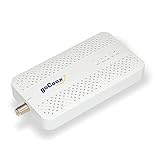
goCoax MA2500D (single adapter)
goCoax MoCA 2.5 Adapter with 2.5GbE Ethernet Port | MA2500D Ethernet Over Coax for Gaming & 4K Streaming | 2.5Gbps, P…
Best for: a verified coax LAN path needing one additional endpoint
- MoCA 2.5 with one 2.5GbE Ethernet port per adapter
- Two compatible peers required; count existing LAN MoCA equipment
Skip this if: Working Ethernet or existing compatible MoCA already meets the need, or the coax carries satellite/unknown shared or ISP service. Map the path before buying; do not buy two new adapters when only one peer is missing.
Check before buying: Needs at least two compatible MoCA peers on a connected 1125–1675 MHz path. Count a compatible built-in LAN MoCA peer before ordering; verify active ISP spectrum and splitters. Not for active satellite coax.
Product fit and sources · 2026-09-13
AI-assisted manufacturer-document review, not hands-on testing.
goCoax MA2500D, 2.5GbE port, single adapter. Verify pack quantity and included power supplies in the selected listing.
Retailer reported in stock (2026-09-13). Availability checks are not editorial approval.

Actiontec ECB6250 (ScreenBeam) MoCA 2.5
ScreenBeam MoCA 2.5 Network Adapter for Higher Speed Internet, Ethernet Over Coax - Starter Kit (Model: ECB6250K02)
Best for: premium performance, reliability-focused setups
- MoCA 2.5
- Solid reliability
- Good premium option

Unmanaged Gigabit Switch (8‑port)
TP-Link 8 Port Gigabit Ethernet Network Switch - Ethernet Splitter | Plug & Play | Fanless | Sturdy Metal w/ Shielded…
Best for: wired backhaul, home office, multiple devices
- Adds Ethernet ports
- Plug-and-play

Cat6 Ethernet Cable
Amazon Basics RJ45 Cat-6 Ethernet Patch Internet Cable, 1Gbps Transfer Speed, Gold-Plated Connectors, 50 Foot, for PC…
Best for: wired mesh nodes, workstations
- Reliable backhaul
- Cheap performance upgrade
MoCA-rated splitter
Best for: MoCA installs
- Reduces MoCA issues
- Cheap fix

MoCA POE filter
Filter, MoCA POE for Cable TV & OTA coaxial Networks ONLY
Best for: MoCA installs
- Improves MoCA reliability
- Often recommended

RG6 coax cable
GE RG6 Coaxial Cable, 25 ft. F-Type Connectors, Quad Shielded Coax Cable, 3 GHz Digital, In-Wall Rated, Ideal for TV…
Best for: MoCA installs, coax cleanup
- Replace mystery coax jumpers
- Cheap reliability upgrade
TP-Link Omada POE160S — Gigabit PoE+ injector
Best for: one compatible 802.3af/at access point without an existing power source
- Active 802.3af/at PoE+
- Gigabit data; up to 30 W injector output
Skip this if: Your access point already has suitable power, or needs passive PoE, 802.3bt, more delivered power than 802.3at supports, or faster-than-Gigabit Ethernet. Ordinary non-PoE mesh nodes cannot be powered just by adding an injector.
Check before buying: One Gigabit data input and one powered Gigabit output. Active IEEE 802.3af/at; up to 30 W at the injector, less at the powered device after cable loss. Match the access point's standard and required delivered power; Ethernet alone does not imply PoE support.
Product fit and sources · 2026-09-23
AI-assisted manufacturer-document and exact-offer review, not hands-on testing.
TP-Link Omada POE160S — Gigabit PoE+ injector; one unit with its supplied power accessories. Selected US retail offer; match the model and variant before buying.
Retailer reported in stock (2026-09-23). Availability checks are not editorial approval.
TP-Link LS108GP — 8-port Gigabit PoE+ switch
Best for: multiple compatible low-power PoE devices within a checked power budget
- Active 802.3af/at PoE+
- 62 W shared budget; up to 30 W per port
Skip this if: Your existing PoE equipment or supplied power adapters already meet the need; you need more than 62 W total, more than 30 W per port, multigigabit, managed VLAN controls, passive PoE or 802.3bt. Do not assume seven devices can each draw maximum power.
Check before buying: Eight total Gigabit ports; the router uplink uses one, leaving at most seven device connections. IEEE 802.3af/at, 30 W maximum at each PoE+ port, but only 62 W shared across all powered devices. Allow for cable losses and check each device requirement. Use standard mode for Gigabit links; do not assume Extend mode keeps Gigabit speed.
Product fit and sources · 2026-09-23
AI-assisted manufacturer-document and exact-offer review, not hands-on testing. Manufacturer 62 W shared budget takes precedence over the conflicting 65 W retailer bullet.
TP-Link LS108GP — 8-port Gigabit PoE+ switch; one unit with its supplied power accessories. Selected US retail offer; match the model and variant before buying.
Retailer reported in stock (2026-09-23). Availability checks are not editorial approval.