
How to fix Wi‑Fi dead zones
Quick answer: fix Wi‑Fi dead zones and dead spots by running a 10-minute walk test, moving the router or mesh node to a stronger halfway point, then wiring the problem node with Ethernet or MoCA if the wireless hop is still unstable.
If you searched for how to fix Wi‑Fi dead zones, how to fix Wi‑Fi dead spots, WiFi dead zones, or a Wi‑Fi dead zone, use the same diagnosis path: prove whether the room has weak signal, interference, or weak backhaul before buying anything.
What should I try first?
Run the walk test first if you have not measured the room. If you already know the symptom, choose placement or backhaul below. Shop only after identifying what your setup is missing; you may not need to buy anything.
On this page
Dead zone vs dead spot (is there a difference?)
In everyday use, dead zone and dead spot mean the same thing. What matters is why it’s dead:
- Coverage problem: weak signal (distance/walls/placement)
- Stability problem: the hop between nodes is weak (wireless backhaul)
- Interference problem: crowded channels (common in apartments/townhomes)
This guide separates those quickly so you don’t buy the wrong thing.
Fast decision: what to do next
Measure first
You only know one room feels bad.
Run the walk test and check RSSI before moving gear.
Do not buy a node from one speed test.
Placement first
RSSI is weak in the bad room.
Move the router or mesh node to a stronger halfway point.
Do not place a mesh node inside the dead zone.
Backhaul first
Signal is decent, but speed swings or calls drop.
Treat it as a backhaul problem: start with wired backhaul for mesh.
Do not add more wireless hops.
MoCA path
You have coax near the router and bad room.
Run the MoCA backhaul decision lab, then check splitters and POE filters.
Do not buy adapters before checking the coax path.
Best first fix
Do this before buying anything: stand in the bad room, check RSSI, then move the nearest mesh node/router halfway back toward the main router. If the number improves but calls still drop, the fix is usually wired backhaul, not another wireless node.
The steps below work for homes and small offices — business Wi‑Fi “dead zones” are usually the same physics, plus more interference.
Quick picture: coverage vs stability
Dead zones are usually either weak signal (coverage) or a weak hop between nodes (stability/backhaul). The steps below separate the two fast.
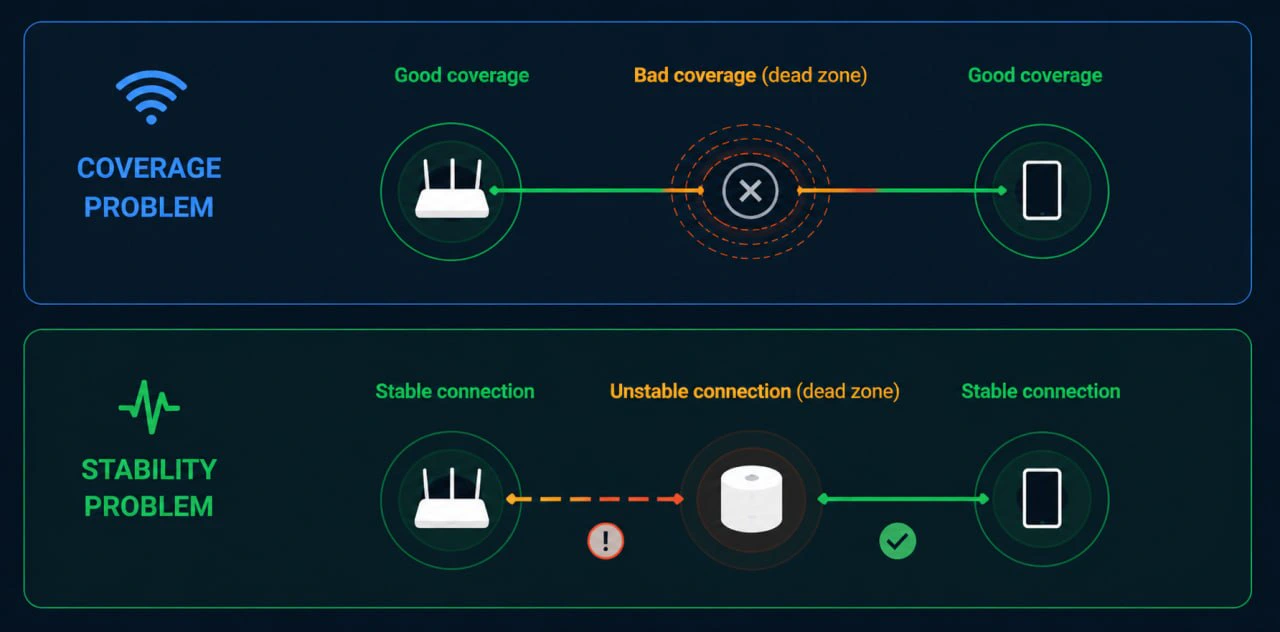
Coverage problem: move or add a node closer. Stability problem: improve backhaul or node placement.
Quick win
If you do only one thing: run a Wi‑Fi walk test. It tells you whether you need more coverage or more stability.
Buying checkpoint
Do not buy a fourth mesh node yet. On this page, the money decision comes after the walk test:
- Weak signal in a room: fix placement first, then consider a better mesh kit.
- Good signal but unstable speed: wire one node with Ethernet or MoCA before adding more wireless hops.
- Usable coax near the bad room: compare MoCA starter kits before shopping for more mesh.
Step 1 | Confirm it’s a real dead zone (not a device issue)
- Test with two devices (phone + laptop) in the same spot.
- If one device is bad everywhere, it’s the device.
- If every device is bad in one area, it’s coverage/backhaul.
Step 2 | Measure signal strength (stop guessing)
Use RSSI (dBm). It’s a simple number that correlates strongly with ‘this area feels dead.’
Step 3 | Fix placement before buying anything
- Move the main router/node toward the center (don’t bury it in a closet/cabinet).
- Don’t place nodes in dead zones. Place them where signal is still strong and let them ‘carry’ coverage.
- One node per floor (near the stairwell) is often better than three nodes on one floor.
Step 4 | Choose the right solution path
| What the walk test shows | Best first move | When to buy gear |
|---|---|---|
| Signal is weak only in one edge room, but the rest of the house is fine | Move the node before buying anything | Buy another node only if a better halfway placement still cannot reach the room. |
| Signal looks acceptable, but speed swings or video calls still fall apart | Treat it as a backhaul problem | Use MoCA vs Ethernet vs Powerline before shopping. |
| You have coax near the router and near the problem room | Check the MoCA path | Use the MoCA starter bundle once the lab confirms splitters, filters, and adapter count. |
| You can run cable or already have Ethernet in the room | Use Ethernet backhaul | Buy cable/switches instead of a more expensive mesh kit. |
| You have no usable coax, cannot run cable, and only need one modest room fixed | Treat powerline as Plan C | Buy from somewhere with easy returns because powerline depends heavily on wiring. |
Fast shopping route
Once the symptom is clear, use the matching buying path instead of browsing everything:
- Need a better mesh system: start with mesh product picks, then narrow by home size in the mesh hub.
- Need one stable wired node: go to wired backhaul for mesh, then choose Ethernet, MoCA, or powerline.
- Need MoCA parts: use the MoCA starter bundle and double-check splitters and filters.
Path A: Mesh (coverage + roaming)
Best when you need whole-home coverage and seamless roaming.
Product picks: Products (eero/Deco/Orbi) after placement is confirmed.
Path B: Wired backhaul (stability)
Best when mesh feels flaky, walls are dense, or the layout forces multiple wireless hops.
Step 5 | Backhaul cheatsheet
- Ethernet: best if you can run a cable. Start here: Ethernet backhaul.
- MoCA: best ‘no drywall’ option if you have coax. Start here: MoCA for mesh backhaul.
- Powerline: last resort. Read: Powerline adapters.
What to buy first (bundle-first)
Reliability add-ons (works with most setups)
If you’re trying to make a home ‘just work,’ backhaul accessories are often a better spend than an extra node.

Cat6 Ethernet Cable
Amazon Basics RJ45 Cat-6 Ethernet Patch Internet Cable, 1Gbps Transfer Speed, Gold-Plated Connectors, 50 Foot, for PC…
Best for: wired mesh nodes, workstations
- Reliable backhaul
- Cheap performance upgrade

Unmanaged Gigabit Switch (8‑port)
TP-Link 8 Port Gigabit Ethernet Network Switch - Ethernet Splitter | Plug & Play | Fanless | Sturdy Metal w/ Shielded…
Best for: wired backhaul, home office, multiple devices
- Adds Ethernet ports
- Plug-and-play

goCoax MA2500D (two-adapter pack)
goCoax MoCA 2.5 Adapter (2-Pack) with 2.5GbE Ethernet Port | MA2500D Ethernet Over Coax for Gaming & 4K Streaming | 2…
Best for: a verified coax LAN path needing two endpoints
- MoCA 2.5 with one 2.5GbE Ethernet port per adapter
- Two compatible peers required; count existing LAN MoCA equipment
Skip this if: Working Ethernet or existing compatible MoCA already meets the need, or the coax carries satellite/unknown shared or ISP service. Map the path before buying; do not buy two new adapters when only one peer is missing.
Check before buying: Needs at least two compatible MoCA peers on a connected 1125–1675 MHz path. Count a compatible built-in LAN MoCA peer before ordering; verify active ISP spectrum and splitters. Not for active satellite coax.
Product fit and sources · 2026-09-13
AI-assisted manufacturer-document review, not hands-on testing.
goCoax MA2500D, 2.5GbE port, two-adapter pack. Verify pack quantity and included power supplies in the selected listing.
Retailer reported in stock (2026-09-13). Availability checks are not editorial approval.

MoCA POE filter
Filter, MoCA POE for Cable TV & OTA coaxial Networks ONLY
Best for: MoCA installs
- Improves MoCA reliability
- Often recommended
Common edge cases
- Garage/outdoor: treat it like a separate zone; wired backhaul or a dedicated outdoor AP is usually best.
- Townhomes/apartments: interference matters; don’t over-deploy nodes.
- ISP gateway stuck in a bad spot: if Comcast/Xfinity, Verizon Fios, Spectrum, or Cox equipment has to stay in a corner or utility panel, use mesh in access-point/bridge mode and wire the problem node with Ethernet or MoCA. For Xfinity, start with bridge mode vs access point mode and Xfinity gateway MoCA.
Next steps
- If you’re stuck: Troubleshooting hub
- If placement is the bottleneck: Mesh placement checklist
- If the wireless hop is the bottleneck: Wired backhaul for mesh
- If you have coax: MoCA starter bundle
- If you’re shopping for mesh: Mesh product picks
- If you’re budgeting: Wi‑Fi extenders (when they work)